Compare the leading workflow automation platforms to find the perfect fit for your business needs
How We Evaluated These Tools
We tested each platform using four critical criteria that matter most to non-technical founders:
Ease of Use (40% weight): How quickly can a non-technical founder set up their first automation? We measured setup time, interface clarity, and learning curve steepness.
Integration Ecosystem (30% weight): Which tools connect to your existing software stack? We counted native integrations and tested connection reliability.
Pricing Transparency (20% weight): Are costs predictable as you scale? We analyzed pricing tiers, hidden fees, and value-per-automation ratios.
Scalability (10% weight): Will the tool grow with your business? We tested performance limits, enterprise features, and migration complexity.
Top Workflow Automation Tools Comparison
| Tool | Best For | Starting Price | Key Strength | Key Weakness |
|---|---|---|---|---|
| Zapier | Non-technical beginners | $19.99/month | 6,000+ integrations, zero learning curve | Expensive at scale, limited logic |
| Make | Visual workflow builders | $9/month | Advanced logic, visual interface | Steeper learning curve |
| Power Automate | Microsoft-heavy orgs | $15/user/month | Deep Office integration, enterprise features | Microsoft ecosystem lock-in |
| n8n | Technical teams | Free (self-hosted) | Open source, unlimited customization | Requires technical setup |
| Nintex | Enterprise processes | $910/month | Advanced process management | Expensive, complex setup |
| Pipefy | Process-focused teams | $20/user/month | Kanban-style process flows | Limited integrations |
| Monday.com | Project management teams | $8/user/month | Built-in project management | Automation as secondary feature |
| Workato | Enterprise integration | Custom pricing | Enterprise-grade security | High cost, complex pricing |
Detailed Tool Reviews
Zapier: The Beginner's Best Friend
Best for: Non-technical founders who need quick wins without complexity.
Zapier pioneered the "if this, then that" automation model and remains the gold standard for simplicity. With over 6,000 app integrations, it connects virtually any software combination you can imagine.
Pricing: Free tier (100 tasks/month), Starter at $19.99/month (750 tasks), Professional at $49/month (2,000 tasks).
Pros: Zero learning curve, massive integration library, excellent documentation, reliable uptime.
Cons: Becomes expensive quickly, limited conditional logic, no visual workflow builder.
Verdict: Choose Zapier if you value simplicity over sophistication and don't mind paying premium prices for ease of use.
Make (Integromat): Visual Power for Complex Workflows
Best for: Teams wanting visual workflow building with advanced logic capabilities.
Make combines visual workflow design with powerful logic features, offering the best balance between usability and functionality. Its scenario-based approach makes complex automations manageable.
Pricing: Free tier (1,000 operations/month), Core at $9/month (10,000 operations), Pro at $16/month (10,000 operations + advanced features).
Pros: Visual workflow builder, advanced logic and filters, excellent value for money, robust error handling.
Cons: Steeper learning curve than Zapier, fewer pre-built templates, smaller integration ecosystem.
Verdict: Make offers the best price-to-power ratio for teams willing to invest time in learning a more sophisticated platform.
Microsoft Power Automate: Enterprise Office Integration
Best for: Organizations heavily invested in Microsoft's ecosystem (Office 365, Teams, SharePoint).
Power Automate excels when your business runs on Microsoft tools. It offers deep integration with Office applications and enterprise-grade security features.
Pricing: Included with Office 365 (limited), standalone at $15/user/month, premium connectors require additional fees.
Pros: Deep Microsoft integration, enterprise security, included with Office 365, AI-powered suggestions.
Cons: Limited non-Microsoft integrations, complex pricing structure, steep learning curve for advanced features.
Verdict: Perfect for Microsoft-centric organizations, but consider alternatives if you use diverse software tools.
n8n: Open Source Flexibility
Best for: Technical teams wanting full control and customization without vendor lock-in.
n8n provides complete workflow automation freedom through its open-source architecture. You can self-host, customize extensively, and avoid subscription fees entirely.
Pricing: Free (self-hosted), Cloud starting at $20/month for hosted version.
Pros: Open source, unlimited customization, no vendor lock-in, active community, cost-effective at scale.
Cons: Requires technical setup, smaller integration library, limited support for non-technical users.
Verdict: Ideal for technical teams prioritizing flexibility and long-term cost control over immediate ease of use.
Nintex: Enterprise Process Management
Best for: Large enterprises needing sophisticated process management and compliance features.
Nintex focuses on complex business process automation with advanced approval workflows, document management, and compliance tracking.
Pricing: Starting at $910/month for the Process Platform.
Pros: Advanced process management, compliance features, enterprise security, extensive customization.
Cons: Very expensive, complex setup, overkill for simple automations, steep learning curve.
Verdict: Only consider Nintex if you need enterprise-grade process management and have the budget to match.
Pipefy: Process-First Automation
Best for: Teams that think in processes and want Kanban-style workflow management.
Pipefy combines process management with automation, using a card-based interface that makes workflow visualization intuitive.
Pricing: Free tier (up to 10 users), Business at $20/user/month, Enterprise at $34/user/month.
Pros: Intuitive Kanban interface, good process visualization, reasonable pricing, built-in forms and databases.
Cons: Limited integration ecosystem, automation features less advanced than dedicated tools.
Verdict: Great for process-heavy businesses that want workflow management and automation in one platform.
When to Choose Which Tool: The Ideople Selection Matrix
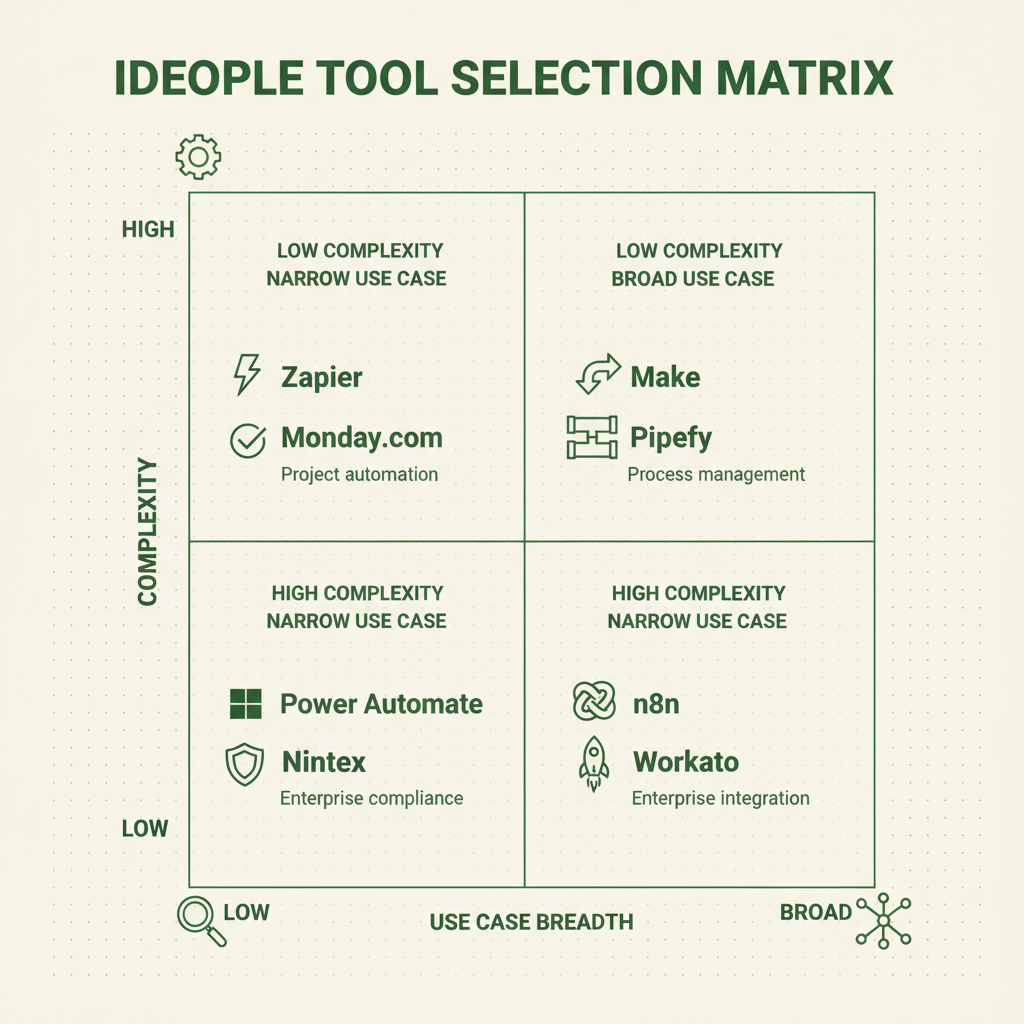
The Ideople Tool Selection Matrix helps you choose based on your actual needs, not feature lists
We've developed the Ideople Tool Selection Matrix to help you choose based on your actual needs, not feature lists. This 2x2 framework plots tools by complexity (low to high) and use case breadth (narrow to broad):
Low Complexity + Narrow Use Cases:
- Zapier for simple app connections
- Monday.com for project-focused automation
Low Complexity + Broad Use Cases:
- Make for visual workflow building
- Pipefy for process management
High Complexity + Narrow Use Cases:
- Power Automate for Microsoft-heavy environments
- Nintex for enterprise process compliance
High Complexity + Broad Use Cases:
- n8n for technical teams wanting full control
- Workato for enterprise integration needs
Decision Framework by Company Size:
Startups (1-10 employees): Start with Zapier or Make's free tiers. Focus on 3-5 critical automations.
SMBs (11-50 employees): Make or Zapier paid plans. Consider Power Automate if you're Microsoft-heavy.
Mid-market (51-200 employees): Power Automate, Make Pro, or n8n cloud. Start planning for enterprise needs.
Enterprise (200+ employees): Nintex, Workato, or self-hosted n8n. Prioritize security and compliance features.
Common Buying Mistakes to Avoid
Myth: "More features mean better value."
Reality: Feature bloat leads to complexity paralysis. Choose tools that excel at your specific use cases rather than trying to do everything.
Myth: "Free tiers are sufficient for testing."
Reality: Free tiers often hide crucial limitations. Test with realistic data volumes and integration needs before committing.
Myth: "We can always migrate later if needed."
Reality: Migration costs average 40+ hours of work and $3,000+ in lost productivity. Choose carefully from the start.
How to Choose Your Tool in 7 Days
Day 1-2: List your top 5 automation needs and required integrations. Map your current software stack.
Day 3-4: Sign up for 2-3 tools that match your complexity needs using our Selection Matrix. Test with real data.
Day 5-6: Build one complete automation in each platform. Measure setup time and ease of troubleshooting.
Day 7: Calculate total cost of ownership for 12 months, including your time investment.
Need help choosing the right automation strategy for your business? Our team at Ideople has helped 200+ companies implement [workflow automation](https://ideople.com/blog/technology/what-is-workflow-automation-the-complete-2026-guide) successfully. [Book a free consultation](https://ideople.com/contact) to discuss your specific needs.
Frequently Asked Questions
Which workflow automation tool is best for beginners?
Zapier remains the most beginner-friendly option with its simple "if this, then that" interface and extensive documentation. Most non-technical users can set up their first automation within 15 minutes. However, Make offers better long-term value if you're willing to invest 2-3 hours learning its visual interface.
What's the difference between Zapier and Make?
Zapier prioritizes simplicity with linear workflows, while Make offers visual workflow building with advanced logic, filters, and branching. Zapier costs more but requires zero learning curve. Make costs less but needs initial time investment to master its more powerful features.
Do I need coding skills for workflow automation tools?
No coding skills are required for Zapier, Make, Power Automate, or Pipefy. These platforms use visual interfaces and pre-built connectors. Only n8n might require basic JavaScript knowledge for advanced customizations, though most functions work without coding.
How much should I budget for workflow automation software?
Most SMBs spend $50-200/month on automation tools. Start with free tiers to test, then budget $20-50/month for basic needs or $100-300/month for advanced requirements. Factor in setup time costs—budget 10-20 hours for initial implementation.
Can workflow automation tools integrate with my existing software?
Major tools like Zapier (6,000+ apps) and Make (1,000+ apps) integrate with most business software. Check each platform's integration directory before choosing. Custom integrations are possible but may require technical expertise or additional costs.
What's the best free workflow automation tool?
Make offers the most generous free tier with 1,000 operations monthly and full feature access. Zapier's free tier (100 tasks/month) is more limited. n8n is completely free if self-hosted but requires technical setup. Most businesses outgrow free tiers within 3-6 months.
Should I choose an open-source or commercial automation tool?
Choose open-source (n8n) if you have technical expertise, want full customization, and prefer avoiding vendor lock-in. Choose commercial tools (Zapier, Make) if you prioritize ease of use, support, and faster implementation over long-term cost savings.
How do I migrate from one automation tool to another?
Document all existing automations first, then rebuild them in the new platform during a testing period. Run both systems in parallel for 2-4 weeks before fully switching. Most migrations take 20-40 hours depending on automation complexity. Plan for temporary productivity dips during transition.
Rubal Gulati
Written by Rubal Gulati at Ideople. We build and run AI agents for our own business, then share what we learn.
Enjoyed this article?
Get AI automation insights delivered to your inbox. Start building with Ideople for free.
Get Started Free